インターフェース
インターフェースとは
抽象クラスの概念をさらに推し進めたのが、インターフェースという概念です。抽象クラスがインスタンスを生成できないように、インターフェースもインスタンスを生成することができませんが、使用方法などは抽象クラスとは根本的に異なります。
サンプルプログラム
インターフェースについて説明する前に、まずは以下のクラスを入力してみてください。
プロジェクトSampleEx501/Program.cs
using System;
using System.Collections.Generic;
using System.Linq;
using System.Text;
using System.Threading.Tasks;

namespace SampleEx501
{
    class Program
    {
        static void Main(string[] args)
        {
            CellPhone cp = new CellPhone("hoge@email.com", "090-1234-5678");
            //  携帯電話クラスで、電話とメールを送る
            cp.Call("011-123-4567");
            cp.SendMail("fuga@email.com");
            //  電話インターフェースでインスタンスにアクセス。
            IPhone phone = (IPhone)cp;
            phone.Call("011-987-6543");     //  電話をかける
            //  phone.SendMail("foo@email.com");        //  メールの送信メソッドは利用できない。
            //  メールインターフェースでインスタンスにアクセス。
            IEmail mail = (IEmail)cp;
            mail.SendMail("bar@email.com"); //  メールを出す
            //mail.Call("011-222-3333");	//  mailインターフェースでは、電話の機能を利用できない。
        }
    }
}
using System;
using System.Collections.Generic;
using System.Linq;
using System.Text;
using System.Threading.Tasks;

namespace SampleEx501
{
    //  携帯電話クラス(IPhone、IEmailクラスを実装
    class CellPhone : IPhone, IEmail
    {
        //  メールアドレス
        private string mailAddress;
        //  電話番号
        private string number;
        //  コンストラクタ(メールアドレスと電話番号を設定
        public CellPhone(string mailAddress, string number)
        {
            this.mailAddress = mailAddress;
            this.number = number;
        }
        //  指定したメールアドレスにメールを送信する
        public void SendMail(string address)
        {
            Console.WriteLine(address + "に、" + this.mailAddress + "からメールを出します。");
        }
        //  指定した番号に電話をかける
        public void Call(string number)
        {
            Console.WriteLine(number + "に、" + this.number + "から電話をかけます。");
        }
    }
}
using System;
using System.Collections.Generic;
using System.Linq;
using System.Text;
using System.Threading.Tasks;

namespace SampleEx501
{
    //  電話インターフェース
    interface IPhone
    {
        //  指定した番号に電話をかける
        void Call(string number);
    }
}
using System;
using System.Collections.Generic;
using System.Linq;
using System.Text;
using System.Threading.Tasks;

namespace SampleEx501
{
    //  電子メール
    interface IEmail
    {
        //  メールを送る
        void SendMail(string address);
    }
}
fuga@email.comに、hoge@email.comからメールを出します。
011-987-6543に、090-1234-5678から電話をかけます。
bar@email.comに、hoge@email.comからメールを出します。
CellPhone(携帯電話)クラスには、電子メールを送る機能と電話をかける機能があります。携帯電話には、電話としての側面と、メール送受信装置としての側面があるわけです。このクラスのように、一つのクラスに複数の側面がある場合によく用いられるのがインターフェースです。
インターフェースの定義
インターフェースは、実装がないメソッドの集合のようなものです。記述方法は以下のようになります。
インターフェースの定義…
}
インターフェースの働き
インターフェースの役割は、抽象クラスと似ています。インターフェース内で定義されたメソッドを、クラスで実装する必要があります。ただ、インターフェースには、メソッドの実装や、フィールドを持つことはできません。
この中には、メソッドの型だけが定義されています。IPhone.csの13行目および、IEmail.csの13行目を見てください。Callメソッド、ならびに、SendMailが記述されていますが、実装はなく、メソッドの後が、;(セミコロン)で終わっています。インターフェースは、単独では利用できません。それを実装するのは、他のクラスです。ここでは、CellPhoneクラスがそれにあたります。
なお、インタフェースのメソッドは、すべて、publicであることが前提なので、publicやprotectedなどをつける必要はありません。また、このインターフェースを実装するクラス内で、該当するメソッドに対して、abstract、およびoverrideをつける必要がありません。
インターフェースの実装
続いて、CellPhone.csの4行目に注目してください。継承と同じようにクラス名の後ろに、:と書き、,で区切られて、IPhone、IEmailと書かれています。この、:の後に追加されているものが、インターフェースです。
インターフェースの実装…
}
継承の場合と違い、インターフェースは複数定義することができます。その場合、インターフェース名の間を","で区切ります。また、通常、インターフェース名は、このンプル内で用いられている「IPhone」「IEmail」などといったように、"I"から始まる英単語を用いるのが普通です。
文法上、Iをつけなくてはならないという決まりがあるわけではありませんが、C#言語のプログラミングのマナーとして、そういう命名方法が推奨されているのです。
キャスト
IPhone、およびIEmailには、それぞれもともとCellPhoneクラスが持っているCall()メソッド、および、SendMail()メソッドが記述されています。なぜわざわざ、そのようなことをしなくてはならないのでしょうか?
実は、こうすることにより、このCellPhoneクラスは、IPhone、および、IEmailという、架空の「クラス」としてふるまうことができるのです。たとえば、Program.csの18行目を見てください。IPhone型の変数、phoneを用意し、そこに、先頭に(IPhone)という文字列を追加する形でcpを代入しています。
インスタンスのキャストIEmail mail = (IEmail)cp; ← CellPhoneクラスを、IEmail型にキャスト
この処理をキャストと言い、あるクラスを、親クラス、もしくはインターフェースの型に変更して代入するときなどに使用します。22行目でも、同様の処理が行われています。
キャストをすると、もとは同じクラスのインスタンスであったとしても、キャストした型のメンバしか使用できなくなります。たとえば、phoneは、Call()メソッド、mailはSendMail()メソッドしか使えなくなります。
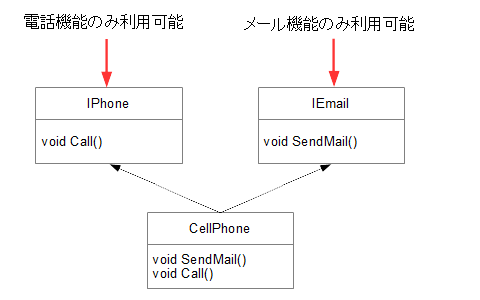
ためしに、21行目、および24行目のコメントアウトを外してみましょう。ビルドエラーが発生します。もとは、同一のCellPhoneクラスオブジェクトインスタンスであるはずのものであるにもかかわらず、実装されているインターフェースのメンバしか使用できなくなるのです。(図5-1.参照)
図5-1.クラスとインターフェースの関係性
インターフェースの必要性
では、なぜわざわざこのようなことをする必要があるのでしょうか?この携帯電話クラスの例を見ても分かる通り、C#のクラスには、様々な側面があります。さらに、大規模なC#のアプリケーションを開発した場合、大勢のプログラマーが、多数のクラスを作成し、それらが複雑に関連していきます。
そういった場合、電子メールの機能に関するクラスを実装する人にとっては、IEmailインターフェースで記述されているメンバを使えれば十分です。また、電話の機能に関するクラスも、IPhoneクラスのメンバが使えれば十分でしょう。そのため、インターフェースを利用して、強制的にクラスの機能を制限することにより、余計なメンバへのアクセスの制限をかけることができるのです。
これにより、プログラマーは、自分の必要なメンバがわかっているので、間違いをおこさず、必要なメンバーだけを利用することができます。これにより、クラスを間違った方法でアクセスされる危険性が減少し、プログラミングの効率もアップします。
インターフェースと抽象クラスの継承の違い
サンプルプログラム
インターフェースは、抽象クラスの継承と似ていますが、根本的に違う部分があります。以下のサンプルを実行してみてください。
プロジェクトSampleEx502/Program.cs
using System;
using System.Collections.Generic;
using System.Linq;
using System.Text;
using System.Threading.Tasks;

namespace SampleEx502
{
    class Program
    {
        static void Main(string[] args)
        {
            Dummy d = new Dummy();
            IFuncs1 i1 = (IFuncs1)d;
            IFuncs2 i2 = (IFuncs2)d;
            //  i1のメソッドを利用
            i1.Func1();
            i1.Func2();
            //  i2のメソッドを利用
            i2.Func2();
            i2.Func3();
        }
    }
}
using System;
using System.Collections.Generic;
using System.Linq;
using System.Text;
using System.Threading.Tasks;

namespace SampleEx502
{
    class Dummy : IFuncs1,IFuncs2
    {
        public void Func1()
        {
            Console.WriteLine("Func1");
        }
        public void Func2()
        {
            Console.WriteLine("Func2");
        }
        public void Func3()
        {
            Console.WriteLine("Func3");
        }
    }
}
using System;
using System.Collections.Generic;
using System.Linq;
using System.Text;
using System.Threading.Tasks;

namespace SampleEx502
{
    interface IFuncs1
    {
        void Func1();
        void Func2();
    }
}
using System;
using System.Collections.Generic;
using System.Linq;
using System.Text;
using System.Threading.Tasks;

namespace SampleEx502
{
    interface IFuncs2
    {
        void Func2();
        void Func3();
    }
}
Func2
Func2
Func3
メソッドの重複
Dummyクラスには、2つのインターフェースIFuncs1、IFuncs2の二つのインターフェースを実装しています。このうち、Func2()メソッドが、両方のインターフェースに含まれていることが分かります。つまり、インターフェースは、クラスの一部を切り取るためのものであり、メソッドの重複があってもかまわないのです。
継承は、あるクラスの機能を受け継ぎ、それをさらに拡張するというものであること、またC#のクラスは単一継承であることから、複数のクラスを継承できないことから、考え方が根本的に違うということがわかります。
練習問題 : 問題5.
 |  |  |